An AI rubric generator needs the assignment before it can produce useful criteria. Paste the task into an AI chat, specify the score scale and weights, then check every descriptor against what students were actually asked to do. Below is a copyable 100-point rubric, a generation prompt and a worked score of 70/100.
Define the assignment before the rubric
Example assignment: students write a 600–800 word argument explaining whether a campus should extend library hours. They must make a specific claim, use at least two credible sources, consider one counterargument, and cite sources consistently. This is a classroom example, so adjust it to your course rules.
The rubric should grade the requested work, not generic writing polish. The four criteria below total 100 points. Each performance level earns the percentage shown of that criterion’s maximum points: Strong 100%, Proficient 75%, Developing 50%, Beginning 25%. No assessable evidence earns 0 for that criterion; Beginning applies to an attempted response that does not meet the next level.
A GitMind AI Chat check on November 4, 2026 returned the requested weighted table and a total of 70/100 for the specified performance levels. The rubric below is a reviewed example you can adapt, not a grade assigned to a real student.
Generate the table in AI Chat
- Open GitMind AI Chat and start a new conversation.
- Paste the assignment below the prompt. Include the required sources, length and counterargument so the criteria reflect the task.
- Set four criteria weighted 30, 30, 20 and 20 points. Request four levels with multipliers of 1, 0.75, 0.5 and 0.25, plus a rule for work that cannot be assessed.
- Review the resulting table. Ask the tool to remove any criterion not required in the assignment and to separate overlapping criteria.
- Copy the table into your document or spreadsheet. Share the reviewed rubric before students submit; use the worked calculation below to check the scoring formula.
The AI produces a draft table. This workflow does not automatically grade a student, publish a grade or connect to a learning-management system.
Prompt for a first draft
Draft an analytic rubric for this assignment: [paste assignment].
Use these four criteria and maximum points: claim/reasoning 30; evidence/attribution 30; counterargument 20; organization/clarity 20.
Use four levels for every criterion: Strong 100%, Proficient 75%, Developing 50%, Beginning 25% of that criterion’s points.
No assessable evidence earns 0; distinguish this from a weak but identifiable attempt at Beginning.
Use observable descriptors tied to the assignment. Do not add unrequested requirements; flag overlapping criteria.
Show the formula and calculate Proficient, Proficient, Developing, Proficient in that order.
Explain how two graders can calibrate the rubric. Return editable text and tables.
Copyable four-level rubric
| Criterion / max | Strong — 100% | Proficient — 75% | Developing — 50% | Beginning — 25% |
|---|---|---|---|---|
| Claim & reasoning / 30 | Specific position; each main reason is explained and connected to the claim. | Clear position; most reasons are explained; one connection is thin. | Position is present; reasons are listed with little explanation. | Position is unclear or reasons do not support it. |
| Evidence & attribution / 30 | At least two relevant credible sources; evidence is interpreted; citations identify sources. | Two relevant sources and citations; some evidence is only summarized. | One relevant source or weak citation trail; evidence is mostly listed. | An attempt at evidence is present, but is irrelevant or cannot be traced to a source. |
| Counterargument / 20 | Fairly presents a plausible objection and responds with reasoned evidence. | Presents an objection and a relevant response, with limited support. | Mentions an objection but offers little response. | An attempted objection misrepresents the opposing view; the response does not address it. |
| Organization & clarity / 20 | Paragraph sequence makes reasoning easy to follow; wording is precise. | Sequence is mostly clear; a few transitions or sentences confuse. | Order is uneven and several sentences obscure the argument. | Structure prevents the reader from following the argument. |
Copy the table into a document or spreadsheet and adapt the descriptors to your task. If you change the criteria or weights, update the prompt and worked calculation too. The weights are 30 + 30 + 20 + 20 = 100; do not add a separate “effort” score unless the assignment explicitly measures it.
Worked scoring example
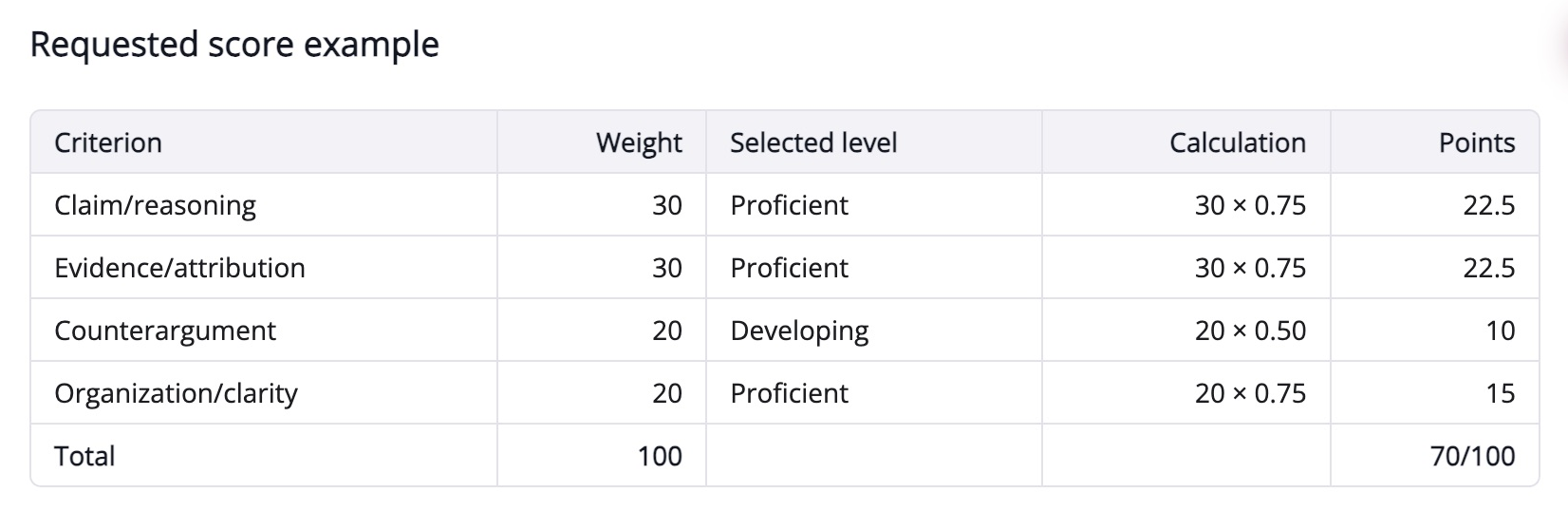
Suppose a submission has a clear but partly unexplained claim (Proficient), two cited sources that are merely summarized (Proficient), a named objection with little response (Developing), and clear organization (Proficient). Score it as follows:
| Criterion | Calculation | Points |
|---|---|---|
| Claim & reasoning | 30 × 0.75 | 22.5 |
| Evidence & attribution | 30 × 0.75 | 22.5 |
| Counterargument | 20 × 0.50 | 10 |
| Organization & clarity | 20 × 0.75 | 15 |
| Total | 22.5 + 22.5 + 10 + 15 | 70 / 100 |
The same score should follow from the descriptors, not from a teacher’s impression of a polished style. If two graders interpret “credible” differently, define permitted source types in the assignment.
Calibrate before using the rubric
Have two teachers independently score the same approved or fictional sample. Compare the evidence used for each criterion, not just the final totals. If one awards 30 points for two named sources while another requires interpretation of those sources, tighten the descriptor before grading the class.
Keep a short note for each criterion, such as “two sources cited, but their evidence is summarized rather than connected to the claim.” Apply your course’s rounding rule once, after the total. For an unsubmitted assignment or a criterion with no assessable evidence, use the stated zero-point rule consistently.
Do not paste identifiable student work into a third-party service without the required permission. You can build and calibrate the rubric using fictional samples first.
Adapt the scale without changing the assignment
For a 20-point total, multiply each final score by 0.2: the worked 70/100 becomes 14/20. If you change criterion weights instead, recalculate every row and confirm the weights still total the intended maximum. A new scale must not introduce an unannounced requirement such as “effort” or “confidence.”
Need student tasks to go with the rubric? See the worksheet-generation example.
