“Nano Banana” is a nickname for Google’s Gemini image generation and editing models. The exact model available in Gemini Apps or the Gemini API can change, and features and limits vary by account, region, and plan. This guide focuses on five reusable workflows: combining references, editing one area, designing a figurine concept, visualizing a floor plan, and building a comic sequence.
Where can you use Nano Banana?
Start in Gemini Apps for conversational image generation or editing. Developers can use the official Gemini API image generation guide to see currently supported models, input formats, output behavior, and limits. Google’s Gemini Apps help explains how to create and edit images in the app. Check the model picker and current plan before following an older screenshot or tutorial.
The examples below work best with source images you own or have permission to edit. Uploading a photo, logo, floor plan, or another person’s likeness requires you to consider privacy and rights first. Generated images can contain errors; inspect the final file at full size.

Five practical workflows and prompts
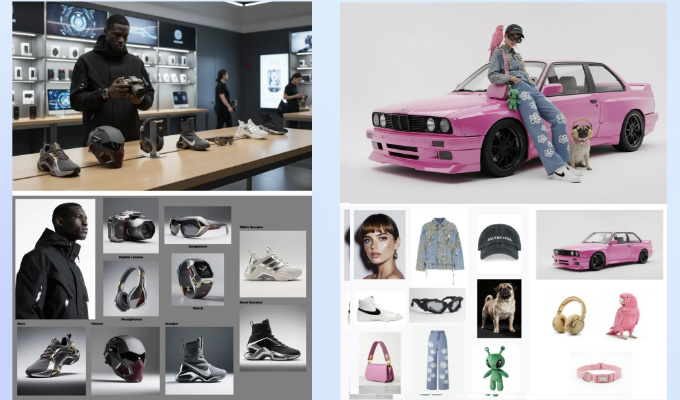
1. Combine several reference objects into one scene
Upload a small set of clear reference images. Name each object in your prompt, describe its position, and specify what must remain unchanged. If an object disappears, retry with fewer items or split the task into stages; a reference image does not guarantee an exact object count.
Create one editorial product photo using my uploaded references. Put the blue notebook on the left, the silver pen in front, and the ceramic cup on the right. Keep each object's recognizable shape and color. Soft daylight, plain desk, no logos or text. If any reference is unclear, tell me before generating.
The original collage screenshot below is a historical example; results and controls may differ in the current product.
2. Edit one part of an existing image
Upload the image, identify the area to change, and state what should be preserved. Compare the output with the source, especially faces, hands, text, and background objects. Localized edits can still change nearby pixels.
Edit only the lamp on the desk: change its shade from white to matte green. Keep the camera angle, desk, books, person's face, and lighting as close to the source as possible. Do not add new objects.

3. Make a collectible-style figurine concept
Use an original character or a reference you have rights to use. Describe material, pose, scale, base, and packaging separately. Treat the result as a visual concept; it is not a manufacturable 3D model or proof of commercial rights.
Turn my original fictional fox character into a collectible figurine concept. Show a front three-quarter view, painted resin texture, a simple round display base, and soft studio lighting. Preserve the character's orange coat and green scarf. No brand marks or existing franchise designs.

4. Visualize a floor plan or neighborhood sketch
Upload a plan that you are allowed to use, label the entrances and major blocks, and ask for a concept illustration. AI may invent dimensions, doors, roads, or structural details. Do not use the generated image for construction, navigation, or safety decisions.
Use the uploaded hand-drawn neighborhood plan as a loose visual reference. Create an isometric concept illustration with the park at the center, three low buildings along the north edge, and a pedestrian path from west to east. Label it “Concept only — not to scale.” Do not infer engineering dimensions.

5. Build a comic in separate panels
Write a short panel script first. Generate a consistent character sheet, then make each panel in sequence with the same clothing and setting description. Add dialogue in a graphics editor if the model renders text incorrectly.
Create panel 1 of a four-panel original comic. Character: Mina, short dark hair, yellow raincoat, blue backpack. Scene: she finds a lost dog outside a library on a rainy afternoon. Medium shot, warm watercolor style, no speech bubbles. Keep this character design for the next panels.

For later panels, refer to the chosen character image and repeat the key visual details. Review continuity before combining panels into one page.
Before sharing or publishing an AI image
- Inspect small details, lettering, object count, and consistency across revisions.
- Confirm you have rights to use source photos, characters, logos, and identifiable likenesses.
- For product claims, maps, or instructional diagrams, verify factual details separately.
- Check the platform’s current usage terms and any disclosure rules that apply to your project.
- Keep the original references and prompt history so you can correct or recreate the image.
The screenshot below shows an older third-party workflow. Availability in a particular platform can change; confirm any current integration or credits on that platform’s own site. The official Gemini paths above are the most direct starting points.

Frequently asked questions
Is Nano Banana a single fixed model?
No. The nickname has been used across Google’s evolving Gemini image model family. Use the official model list and your product’s current picker for the exact model name.
Can it edit only one region without changing anything else?
You can request a local edit, but preservation is not guaranteed. Compare source and output and retry with a narrower instruction if needed.
Can I publish or sell the result?
Check the current platform terms and the rights to every source element. A generated image does not clear third-party likeness, copyright, or trademark issues for you.

Leave a Comment