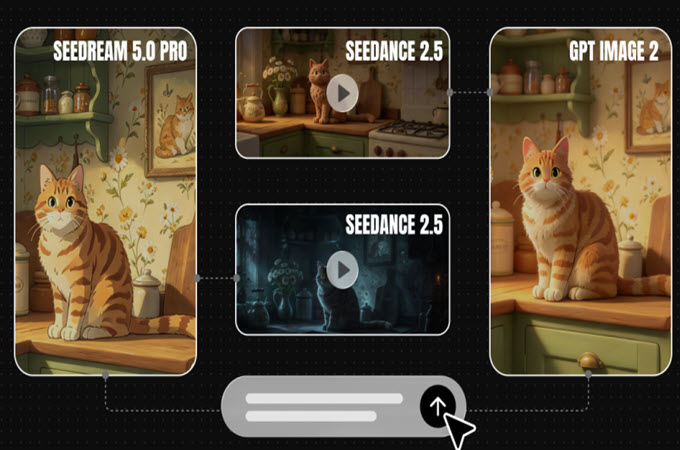
Collectors spend hours arranging a shelf: The right spotlight, the perfect spacing, the one figure that gets centre stage. Then they snap a photo, and half the magic disappears. A photo can’t capture the slow turn that shows off a sculpted cape or the glint on a painted visor. With an AI video generator, you can turn a still picture of your display into a short showcase video with a gentle camera move. Dreamina and Seedance 2.5 handle the motion, and you set the mood with a prompt. Here’s how to prepare your photo, write the prompt, and finish a showcase that does your collection justice.
- Why collectors love a slow turn
- Photographing the display well
- Create a rotating showcase of your shelf in three simple steps from Dreamina
- Camera moves that flatter small objects
- Making the around them
- What Seedance 2.5 does for showcase footage
- Showing your collection honestly
Why collectors love a slow turn
Figurines are three-dimensional objects, and photographs flatten them. A slow orbit or a gentle push-in restores the sense of depth, letting viewers see sculpted edges, paint details, and the way light moves across surfaces. It’s the same reason museums use turntables. A short showcase also gives you something shareable for collector groups, auction listings, and social posts, and it can make a small display feel like a gallery piece. Collectors also love comparing details, so a clean video helps.
Photographing the display well
A better photo means a better video. Check these before you upload:
Lighting: soft, even light from above or the side
Backdrop: plain or darkened, so the figures stand out
Angle: slightly below eye level for a heroic look
Glass reflections: reduce glare from windows and lamps
Full subject: the whole figure in frame, with space around it
Clean the dust off the figures first. It shows up in close-ups. Take a few angles and pick the strongest.
Create a rotating showcase of your shelf in three simple steps from Dreamina
Step 1: Upload an image and write the prompt
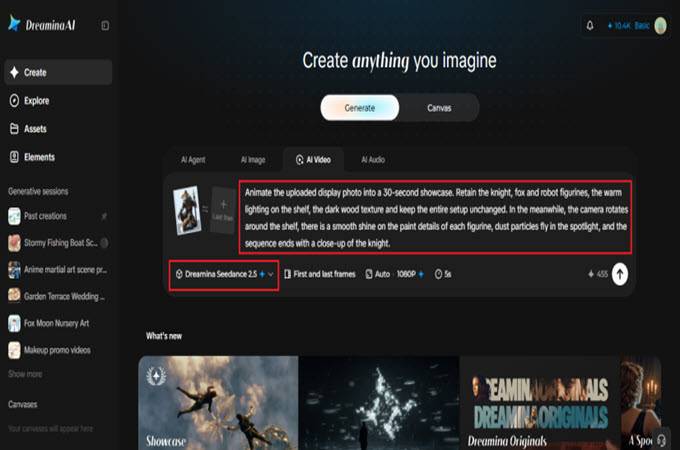
Visit Dreamina, sign in, and go to the AI Video tab. Click “Upload reference image” and upload your photo. Next, you can write your prompt.
Here’s an example that can be used to create a 30-second video: Animate the uploaded display photo into a 30-second showcase. Retain the knight, fox and robot figurines, the warm lighting on the shelf, the dark wood texture and keep the entire setup unchanged. Meanwhile, the camera rotates around the shelf, there is a smooth shine on the paint details of each figurine, dust particles fly in the spotlight, and the sequence ends with a close-up of the knight.
Don’t include more than one camera movement in the prompt.
Step 2: Create your video
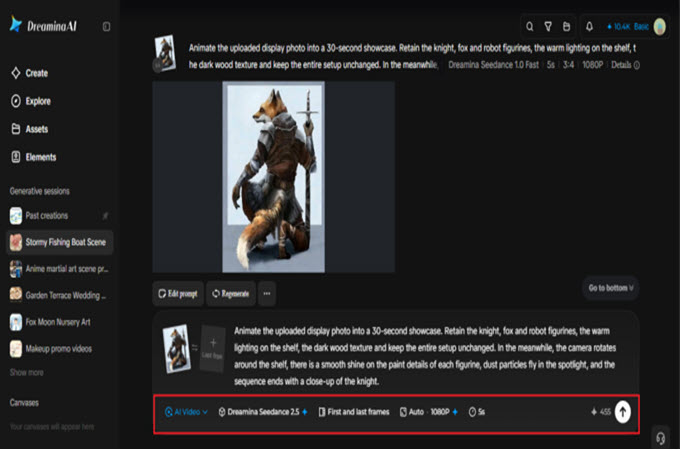
Choose Seedance 2.5, set the clip length, select 16:9 for YouTube or 9:16 for TikTok. Click Dreamina’s icon and wait for it to process. Wide frames suit full-shelf shots, while vertical suits single figures. Test a short clip first to check the look.
Step 3: Enhance and export
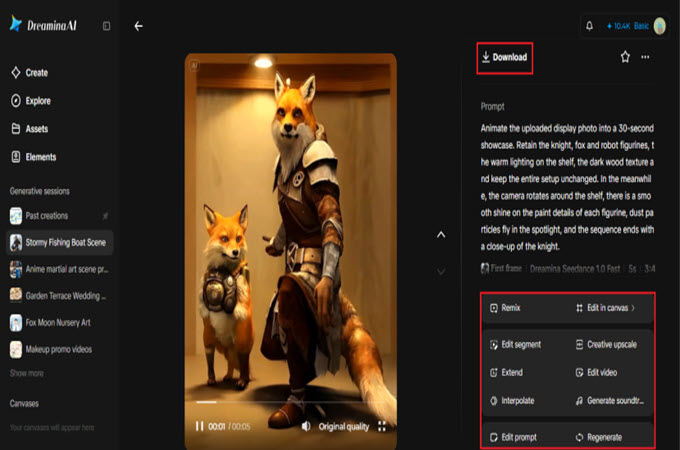
Use Dreamina’s AI editing tools to polish the clip. Upscale sharpens the paint details, and Generate soundtrack adds a subtle cinematic score. Then export the video and share it. If a figure looks warped, ask for a slower, simpler camera move.
Camera moves that flatter small objects
Small objects look best with slow, smooth camera work. An orbit shows off the sculpt. A push-in reveals detail. A low-angle drift makes a figure feel monumental. Avoid fast whips and shaky moves, which make a miniature look like a toy rather than a collectable. Name one move per prompt, and ask for shallow depth of field, so the background softens and the figure pops. Smooth beats dramatically every time. A steady hand beats a flashy trick.
Making the scene around them
Atmosphere can transform a display. Ask for subtle mist at the base, a faint colored rim light, or soft particles floating in a spotlight. Match the mood to the figure: warm amber for a knight, cool blue for a robot, neon pink for a cyberpunk character. Keep the changes small, so the figures stay recognizable. Mist and glow should whisper, not shout.
What Seedance 2.5 does for showcase footage
Close-ups of sculpted objects ask a lot of a video model, and a few Seedance 2.5 upgrades help.
Camera angles that shift
Spatial perspective changes let you move the viewpoint around a figure while the model fills in missing detail.
Textures that feel physical
The reduced artificial look helps paint, plastic, and metal keep convincing surface detail. Those details are why collectors look twice.
Steadier frames
Better consistency from cut to cut keeps the figure’s shape and colors stable during the move. It keeps the sculpt from drifting.
Fixes without a full redo
Region-level editing can remove a distracting object from the shot without regenerating the entire clip.
Showing your collection honestly
If you’re selling or trading, be clear about what’s real. Use enhanced footage as a presentation, and share unedited photos of the actual condition, including scuffs, missing parts, and packaging. Don’t change a figure’s color or size in a way that misrepresents it. Buyers appreciate honesty, and your reputation lasts longer than any single sale. For personal sharing, enjoy the artistic freedom, but keep the facts straight when money is involved.
Give your shelf a spotlight
A collection deserves more than a flat photo. Dreamina and Seedance 2.5 let you add a slow, cinematic turn that shows off every detail. Pick your best display shot, upload it, and write a simple camera prompt. Your figures have been waiting for their moment on stage. Share it with fellow collectors and compare notes.

Leave a Comment