
If your notes already have headings and lists, you can turn that structure into a mind map without redrawing it branch by branch. Save the outline as a .md file, open GitMind, choose More → Import local file, upload the file, and confirm the import. Then check the branches against your original document before sharing the map.
GitMind supports Markdown as a local import format. Its October 2026 update also improved how Markdown content and formatting are handled during conversion. That makes a structured outline a useful starting point, but a converted map still needs a quick editorial pass. A heading that looks fine on a page can become an unwieldy branch when viewed all at once.
Prepare a Markdown outline
Start with one subject and a small number of meaningful sections. Use a top-level heading for the main topic, lower-level headings for major branches, and short list items for details. Markdown headings use one or more # characters, while list items can use a hyphen; the CommonMark specification documents the syntax if you need a reference.
Here is a copyable example for a workshop plan:
# Workshop plan## Goal- Explain the topic in one sentence- End with one practice task## Agenda- Introduction- Demonstration- Practice## Follow-up- Share the resource list- Collect open questionsAfter import, look for Workshop plan as the central topic and Goal, Agenda, and Follow-up as its main branches. Check that each list item appears under the right branch. If a heading or bullet lands elsewhere, move it in the map or simplify the source outline and import it again.
Before saving your own file, shorten headings such as “Everything we need to discuss before the workshop begins” to a label such as “Preparation.” Keep detailed explanations in the source document or add them after conversion. A map is most useful when the branches reveal the shape of the information at a glance.
Import the file into GitMind
- Save your outline as a local
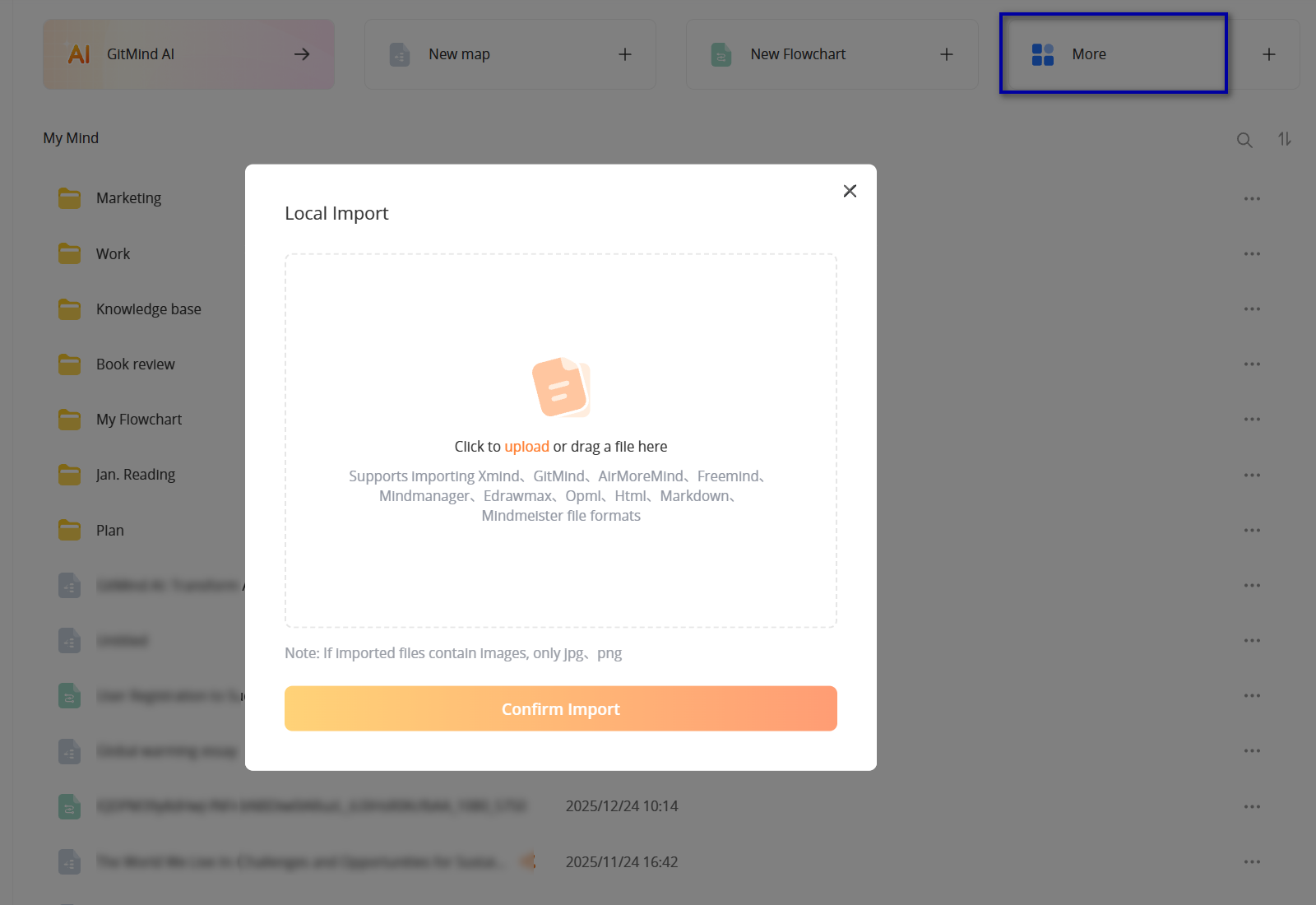
.mdfile. Open it once in a text editor to confirm the headings and lists are in the order you expect. - Open GitMind and go to My Mind. Select More → Import local file.
- In the import window, upload the file or drag it into the upload area, then select Confirm Import.
- Open the imported map and compare its main branches with your Markdown headings. Rename, move, or split nodes where the visual structure needs work.
These controls follow GitMind’s current Import Mind Map guide. The guide lists Markdown among supported local formats and confirms that imported content can be edited afterward.
Review the converted map
Conversion gives you a starting structure, not a reason to discard the source. Check the parts that affect meaning before you send the map to a classmate or teammate.
| Check | What to do |
|---|---|
| Branch levels | Make sure a subsection did not become a peer of the main topic. Move nodes or simplify the source outline if the hierarchy is confusing. |
| Long labels | Replace sentence-length nodes with short labels. Keep the full explanation in the original Markdown or in a note attached to the map. |
| Code blocks and tables | Compare them with the source file. Do not assume that every Markdown element will be represented as useful map nodes. |
| Links and images | Open important references from the source file and check whether the imported map preserves enough context to understand them. |
| Missing qualifications | Look for words such as “only,” “unless,” and “not.” A branch that drops a condition can change the meaning of the original note. |
If the map is too dense, do not keep adding colors to compensate. Remove repeated branches, combine closely related points, and move supporting details out of the main view. The result should help someone understand the topic faster than reading the raw outline.
When this workflow helps
Study notes: A Markdown outline can become a chapter overview. Keep definitions and examples under the concept they explain, then compare every important claim with your course material.
Project plans: Turn a text plan into branches for goals, deliverables, risks, and next steps. A map can reveal an overloaded workstream or a missing owner before the plan is shared.
Documentation and READMEs: Import a section-level outline to discuss the document’s structure. Keep commands and exact technical details in the original file; use the map to navigate the topics and dependencies.
When to use a different input
Markdown import works best when your file already has a clear hierarchy. If you have a scanned page, a PDF report, or a slide deck instead, use GitMind’s File to Mind Map workflow for those formats. If the material is mostly free-form prose, outline its main ideas first; simply changing its file extension to .md will not create a useful hierarchy.
For a first attempt, import one short section. Once its branches are clear, expand the source or bring in a longer outline. That small check is faster than cleaning up a large map built from a document that was never structured for visual reading.

Leave a Comment