Free AI Question Generator
Automatically generates multiple-choice (single and multiple answers), fill-in-the-blank, and true/false questions, with instant reference answers to help you quickly create customized quizzes.

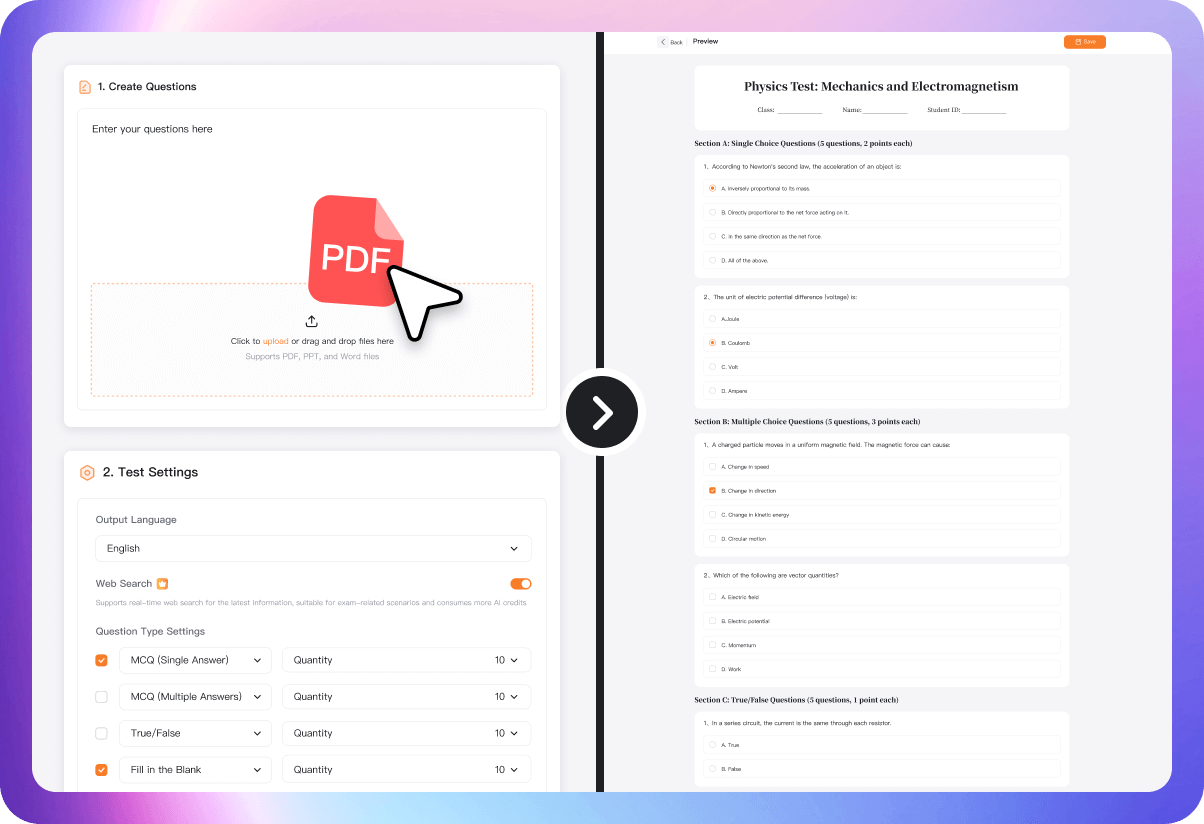
1. Create Questions

Click to upload or drag and drop files here
Supports PDF, PPT, and Word files

2. Test Settings

Supports real-time web search for the latest information, suitable for exam-related scenarios and consumes more AI credits

How to Use the GitMind AI Question Generator?
In just three steps, AI handles question generation, explanations, and test assembly, greatly reducing lesson preparation and practice setup time.
-
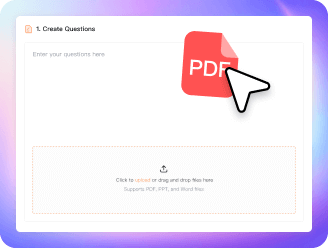
🌟 Step 1: Enter a topic or upload learning materials
Enter chapters, concepts, or topics, or paste textbook content or lecture notes.
-
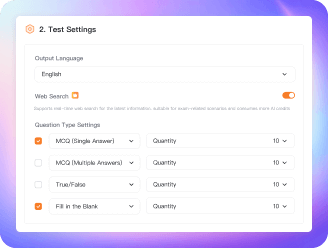
🌟 Step 2: AI generates questions automatically
AI creates questions based on your settings, supporting multiple question types such as multiple-choice, fill-in-the-blank, and true/false, etc.
-
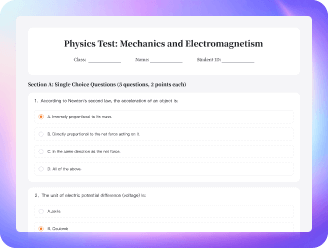
🌟 Step 3: Start practicing or save your test
Complete the questions directly on GitMind, generate a shareable link for students, or save the test as a PDF or image for easy printing.
Core Advantages of the GitMind AI Question Generator
-
AI-Powered Question Creation
Creates questions based on key concepts, focusing on core test topics—ideal for classroom checks, daily practice, and review.
-
AI Quiz Generation
Export a complete quiz with one click, including questions, answers, and explanations, boosting efficiency in creating questions.
-
AI Test Generation
Quickly create complete tests for exams, unit tests, homework practice, and review handouts.
-
Works with Multiple Content Types
Lecture notes, reading passages, textbook chapters, and even handwritten content can be converted into questions.
-
Easy multi-format export
Export tests as images, PDFs, or Word documents for easy printing, sharing, or archiving.
-
Boost Teaching and Self-Learning Efficiency
Save time on question creation, improve teacher prep, and allow students to automatically generate practice questions.
When to Use the GitMind AI Question Generator?
Suitable for a wide range of scenarios, including classroom teaching, question creation, teaching material organization, self-study, and exam preparation.
-
 Classroom Teaching
Quickly prepare questions, assignments, or quizzes.
-
 Supports Multiple Question Types
Includes multiple-choice (single and multiple answers), fill-in-the-blank, and true/false questions to meet a wide range of assessment needs.
-
 Self-Study Practice
AI can automatically generate questions tailored to your weak areas.
-
 Teaching Material Organization
Turn your lecture notes into a question bank or ready-to-use tests.
-
 Exam Preparation
Quickly generate chapter-based practice questions to help you review more efficiently.
-
 Tutoring and After-School Programs
Quickly build a rich library of practice questions across multiple question types, saving prep time and improving lesson readiness.
FAQ
-
How do I generate questions with the GitMind AI Question Generator?
Simply enter the concepts you want to assess or upload a document. GitMind AI analyzes the content and quickly generates relevant practice questions.
-
Can GitMind AI generate questions without specific source text?
Yes. Just provide a core topic (such as “World War II” or “Photosynthesis”), and the AI will expand on it using its knowledge base to generate related questions and spark ideas.
-
Does GitMind AI support generating questions from mind maps?
Yes. GitMind integrates with mind maps to turn key concepts directly into questions, creating a smooth flow from knowledge organization to learning assessment.
-
Can I download the generated quizzes?
Yes. Quizzes can be downloaded as images, PDFs, or Word files, or shared online directly.
-
How is my data kept secure?
All uploaded data is encrypted and automatically deleted once processing is complete.